Rollout areas change quickly
Filter active territory and keep address-level outreach tied to the latest operating plan.

Field OS gives connectivity teams one operating view for service-area outreach, address qualification, signup appointments, and installation follow-through.
Combine rollout territories, address qualification, provider context, signup appointments, and installation milestones in one canvasser-ready view.
Give every property, conversation, appointment, and outcome the context your team needs to act.
Filter active territory and keep address-level outreach tied to the latest operating plan.
Store service interest, current provider, household needs, and follow-up on the property.
Track the customer lifecycle beyond the initial appointment without a second record.
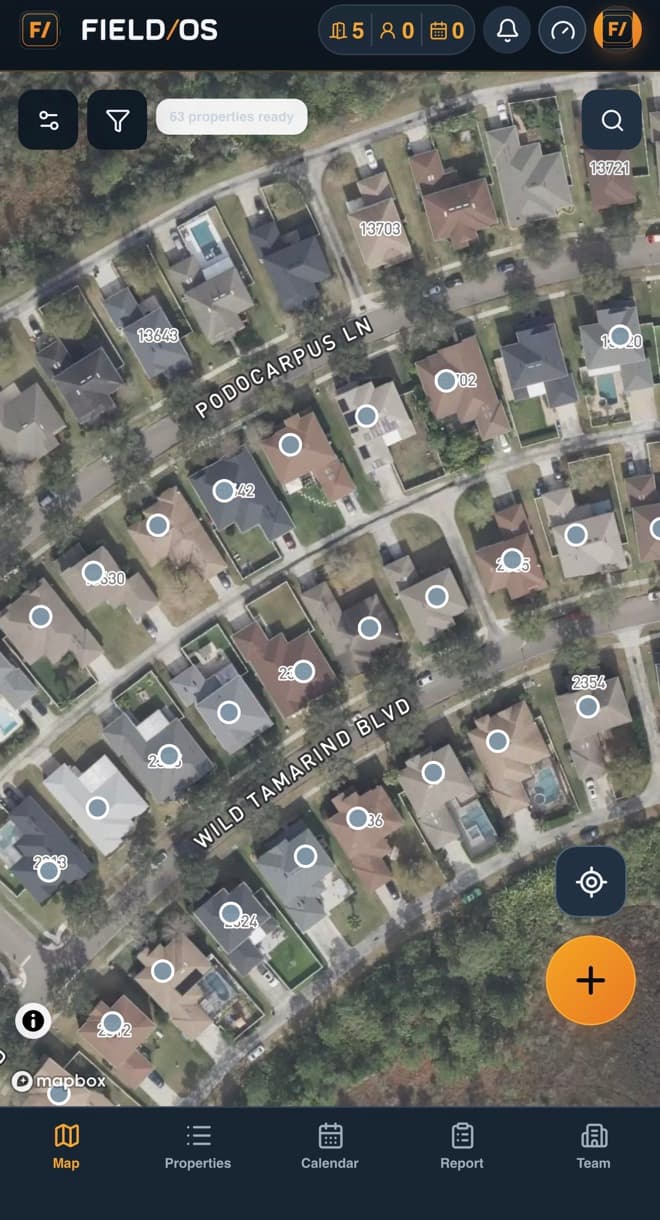
Field OS keeps field teams, managers, and sales specialists aligned without turning the work into another administrative burden.
Field OS is not only a map or a lead list. It gives telecom companies a shared operating record for territory planning, field execution, customer handoffs, documentation, and performance management.
Place teams on the right blocks with shared property dispositions. Managers can review the activity and its outcome without asking the field team to recreate the story later.
Capture provider context, speed needs, decision-maker details, and signup intent. Managers can review the activity and its outcome without asking the field team to recreate the story later.
Move the property from appointment to signed and installed customer milestones. Managers can review the activity and its outcome without asking the field team to recreate the story later.
Place teams on the right blocks with shared property dispositions. Managers can review the activity and its outcome without asking the field team to recreate the story later.
Use role-aware access to keep representatives focused on their assignments while company leaders retain visibility across territories, appointments, evidence, customer milestones, and team performance.
Place teams on the right blocks with shared property dispositions.
Capture provider context, speed needs, decision-maker details, and signup intent.
Move the property from appointment to signed and installed customer milestones.
Start with Field OS and give every field interaction a clear next step.
Start your free trialChoose another industry, or use the Field OS logo and footer navigation to return to the main website.